How to Choose Between an Email Security Gateway and Built-In Filtering
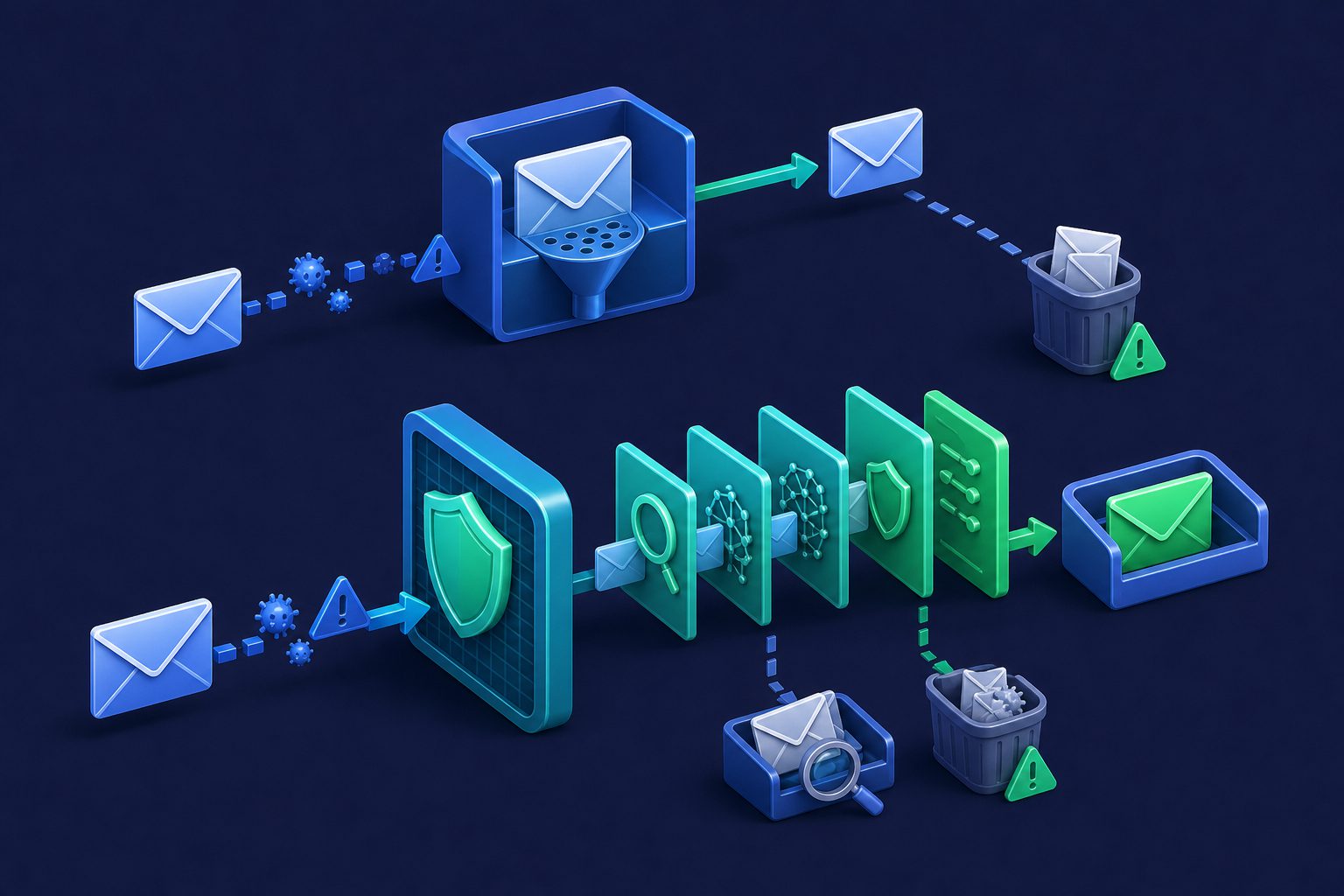
Every major email provider includes some form of spam filtering. Gmail catches most junk. Outlook flags suspicious messages. Yahoo sorts newsletters into folders. For many people, these built-in filters are good enough.
But "good enough" has limits. Built-in filters are designed for general use across billions of accounts. They are not tuned for your domain, your senders, or your specific threat profile. When spam gets through, when phishing slips past, or when your business needs stricter control over what reaches inboxes — that is when dedicated email security gateways enter the picture.
This guide explains the difference, when each approach makes sense, and how to decide which one your organization needs.
What is built-in email filtering?
Built-in filtering is the spam detection that comes with your email provider. When you use Gmail, Outlook, Yahoo, or any major email service, their servers automatically scan incoming messages and sort them:
- Inbox: Messages the filter considers legitimate
- Spam/Junk: Messages the filter considers unwanted
- Tabs or categories: Gmail's Primary/Promotions/Social sorting, Outlook's Focused Inbox
These filters use a combination of sender reputation, content analysis, user feedback (what their users have marked as spam), and machine learning trained on their entire user base. Gmail processes over 300 billion emails per week — that training data gives it a broad view of spam patterns.
How built-in filters make decisions
Built-in filters primarily use:
- Global reputation: Is the sending IP or domain known to send spam across all accounts?
- Content patterns: Does the email match known spam templates, phishing patterns, or malware signatures?
- User signals: Have other users on the platform marked similar messages as spam?
- Authentication: Do SPF, DKIM, and DMARC pass? (Failure increases spam score)
What they generally do not do: per-domain tuning, per-address thresholds, virus scanning of all attachments, sender categorization, delivery scheduling, or quarantine with manual review.
What is an email security gateway?
An email security gateway (also called a Secure Email Gateway or SEG) is a dedicated service that sits between the internet and your email infrastructure. All inbound email passes through the gateway first. The gateway inspects, filters, and either delivers or blocks each message before it reaches your mail server or inbox.
The gateway is configured via your domain's MX records. Instead of pointing MX to your mail server directly, you point it to the gateway. The gateway processes the email, then forwards clean messages to your server.
What a gateway adds beyond built-in filtering
- Multi-layered detection: Dedicated spam scoring engines (like Rspamd), DNS blacklist checks, Bayesian classification, AI content analysis, and sender reputation — all applied before delivery
- Virus and malware scanning: Attachment scanning with engines like ClamAV catches malicious files before they reach your devices
- Quarantine: Borderline messages are held for manual review instead of being silently delivered or silently dropped
- Per-address configuration: Different email addresses can have different spam thresholds, filter rules, and security policies
- Sender management: Whitelist, block, mute, or prioritize individual senders across your organization
- Centralized control: One dashboard to manage security policies for all addresses on your domain
- Provider independence: The gateway works regardless of what email server or provider you use behind it
Built-in filtering: strengths and limits
Strengths
- Zero configuration: Works immediately with no setup required
- Massive training data: Gmail, Outlook, and Yahoo see billions of emails daily, giving their filters unmatched pattern recognition for common spam
- Free: Included with every account at no extra cost
- Continuously updated: Filters evolve as new spam patterns emerge across the platform
- Good for personal use: For individual accounts with moderate email volume, built-in filters catch 95-99% of spam
Limits
- No per-domain tuning: You cannot adjust spam thresholds, add custom rules, or configure detection to match your specific needs
- No quarantine: Messages are either delivered or sent to spam. There is no middle ground for borderline messages that need human review
- No virus scanning guarantee: While providers scan for some malware, it is not comprehensive and you have no visibility into what was scanned
- No sender management: You cannot categorize senders, track sender behavior over time, or set per-sender policies
- False positives are invisible: Legitimate emails that land in spam may go unnoticed for days. There is no alert or review queue
- One-size-fits-all: Every address on your domain gets the same filtering. The CEO's inbox and the public
info@address have identical spam handling - Forwarded email issues: When email is forwarded from another domain, SPF alignment often breaks, causing the built-in filter to flag legitimate forwarded messages as suspicious
Email security gateway: strengths and limits
Strengths
- Configurable thresholds: Set different spam sensitivity per address, per domain, or per team
- Quarantine with review: Borderline messages are held for manual decision instead of being silently sorted
- Multi-engine detection: Combines spam scoring, blacklists, authentication, virus scanning, and AI classification in a single pipeline
- Sender management: Track, categorize, and control senders across your organization from one dashboard
- Works with any provider: Protects Gmail, Outlook, Exchange, Postfix, or any SMTP server without requiring a provider switch
- Visibility: See every email that arrives, every spam score, every detection result. No black box
- Advanced protection: Features like rate limiting, sender approval, and delivery scheduling go beyond what any built-in filter offers
Limits
- Not free: Dedicated security gateways are paid services, adding cost on top of your existing email
- Requires DNS changes: You need to update your domain's MX records to point to the gateway
- Added complexity: Another service to configure, monitor, and manage
- Potential latency: An additional hop in the delivery chain adds a small amount of processing time
Side-by-side comparison
| Built-in filtering | Email security gateway | |
|---|---|---|
| Cost | Free (included) | Paid service |
| Setup | None | MX record change |
| Spam detection | Good for common spam | Multi-engine, configurable |
| Virus scanning | Basic / opaque | Dedicated (ClamAV or similar) |
| Quarantine | No (spam folder only) | Yes, with review queue |
| Per-address thresholds | No | Yes |
| Filter rules | Basic (provider-dependent) | Advanced (conditions, regex, actions) |
| Sender management | Block/allow only | Categories, states, reputation tracking |
| Rate limiting | No | Yes (per sender, per address) |
| Delivery scheduling | No | Yes (business hours, etc.) |
| Visibility | Minimal (spam folder) | Full (logs, scores, decisions) |
| Provider lock-in | Tied to your email provider | Works with any provider |
When built-in filtering is enough
For many situations, your email provider's built-in filter is genuinely sufficient:
- Personal email with low-to-moderate volume
- No custom domain — you use
@gmail.comor@outlook.comdirectly - Spam is not a significant problem for your usage pattern
- No compliance requirements for email security or data retention
- No mail server to protect — your provider handles everything
If your Gmail spam folder catches everything and you never miss important emails, adding a gateway would be paying for a problem you do not have.
When you need an email security gateway
- Your domain receives spam that built-in filters miss. If spam, phishing, or unwanted email regularly reaches your inbox despite your provider's filter, a gateway adds detection layers your provider does not have.
- You run a mail server. Self-hosted servers (Exchange, Postfix, Zimbra) often have minimal built-in filtering. An MX relay gateway filters threats before they reach your server.
- You need per-address policies. When your CEO's inbox needs stricter filtering than the public
info@address, you need per-address thresholds that built-in filters do not offer. - You want quarantine. Borderline messages that might be spam need human review, not automatic sorting into a folder nobody checks.
- You need sender control. Whitelisting trusted senders, blocking persistent spam sources, and tracking sender reputation over time requires dedicated contact management.
- You use email forwarding. If you forward email from a custom domain to Gmail or Outlook, SPF alignment issues cause false positives. A gateway with proper SRS handling solves this.
- You want visibility. When you need to see what was blocked, why, and by which detection rule — not just a spam folder with no explanation.
The layered approach
Using a gateway does not mean turning off your provider's built-in filter. The two work together as layers:
- Gateway layer (first): Catches spam, phishing, viruses, and authentication failures before delivery. Quarantines borderline messages.
- Provider layer (second): Gmail, Outlook, or your server's filter provides a second check on delivered messages.
This defense-in-depth approach means two independent systems would need to miss the same threat for it to reach your inbox. In practice, the gateway catches the majority of threats, and the provider's filter handles the occasional message that gets through.
How Cleanbox works as an email security gateway
Cleanbox functions as an inbound email security gateway. For personal use, your email aliases route through Cleanbox's detection pipeline before forwarding to your inbox. For businesses with existing mail servers, Relay acts as a dedicated MX gateway that filters all inbound email before forwarding to your server via SMTP.
Both approaches include the full detection stack: Rspamd spam scoring, DNSBL blacklist checks, SPF/DKIM/DMARC validation, ClamAV virus scanning, AI classification, and crowd-sourced sender reputation. On top of that, features like contact categorization, per-address spam thresholds, Shield, and custom filter rules give you control that no built-in filter provides.
For more on inbound email security, see Secure Inbound Email: How to Protect Your Domain. For a comparison of routing services that include gateways, see Best Email Routing Services for Custom Domains.
Ready to take control of your inbox?
Start protecting your email with Cleanbox — free plan available, no credit card required.
Get started free